

Human Pass proves you’re a real person online without showing anyone who you are. It lives in the Human Pass Me module inside the ShareRing Me app, it’s backed by an identity ShareRing has checked, and each person can only ever hold one.
In 2024, automated traffic overtook human traffic on the web for the first time in a decade, at 51 percent, according to the 2025 Imperva Bad Bot Report from Thales. Captchas, phone numbers and paid ticks were meant to keep bots out, and bots still get through. Human Pass gives a real person a way to prove it that a bot can’t copy, and it doesn’t ask you to hand your ID to every site you use.
What Human Pass is.
ShareRing offers Privacy focussed KYC, and Human Pass is built on it. When you verify your ID in ShareRing Me, your documents are checked and stay in your own vault on your phone. Human Pass turns that checked identity into a pass that tells anyone who looks that a Verified Human holds it, and nothing more about you.
Each verified identity can hold one Human Pass. Someone running a thousand bot accounts can’t mint a thousand passes, and the same ID document can’t be used to mint a second one. Every pass is anchored on ShareLedger, ShareRing’s own blockchain, so anyone can check it is real. The first 1,000 passes carry a Genesis mark.
What Human Pass does today.
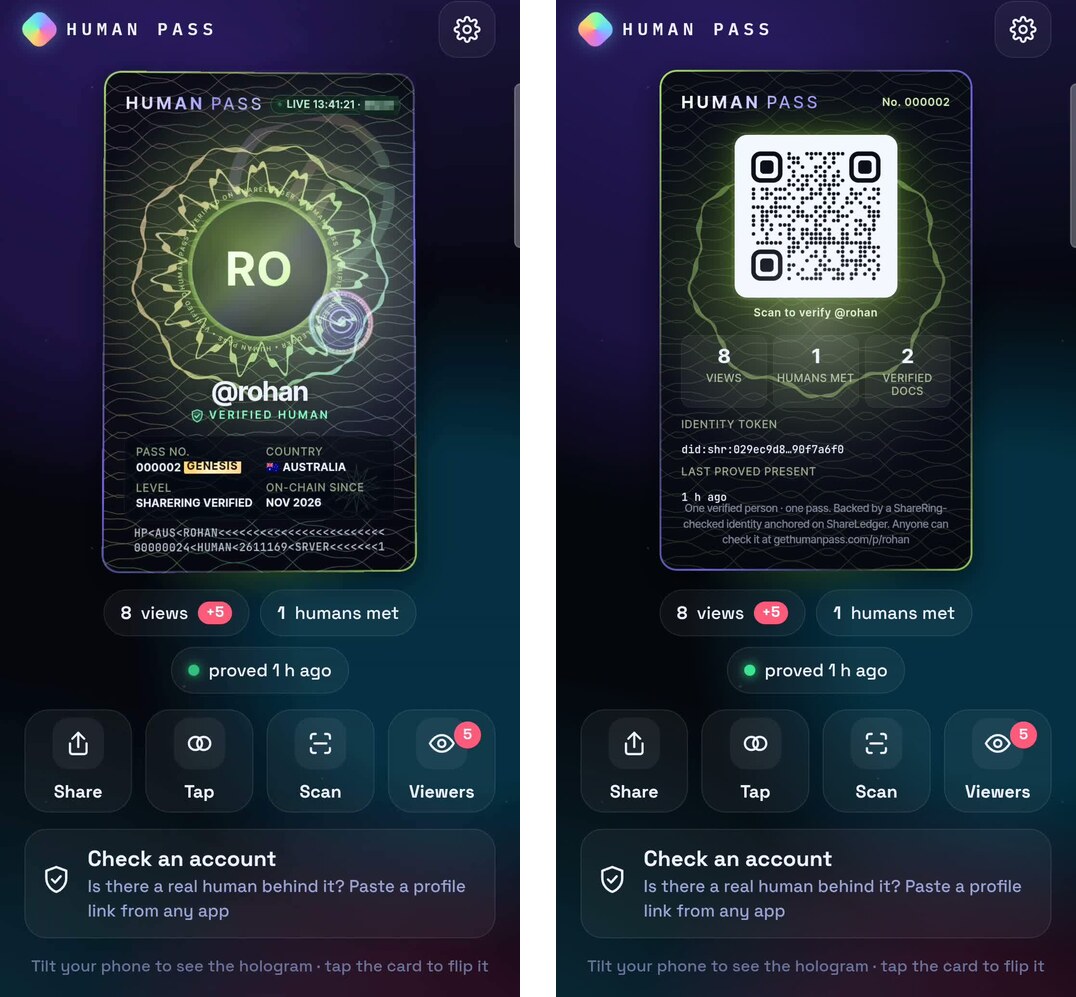
It gives you a pass that can’t be faked with a screenshot.
Your pass in the Human Pass Me module is a live card. It shows a clock and a short code that changes every 30 seconds, so a screenshot gives itself away straight away. Tilt your phone and the hologram moves, and tap the card to flip it to a QR code that says “Scan to verify”.
Every pass also has a public page at gethumanpass.com/p/ followed by your handle. It shows that your identity was checked by ShareRing, that the pass is anchored on ShareLedger and when you last proved you were present with your PIN. It never shows your documents or what’s in them.
It tells you whether there’s a real person behind an account.
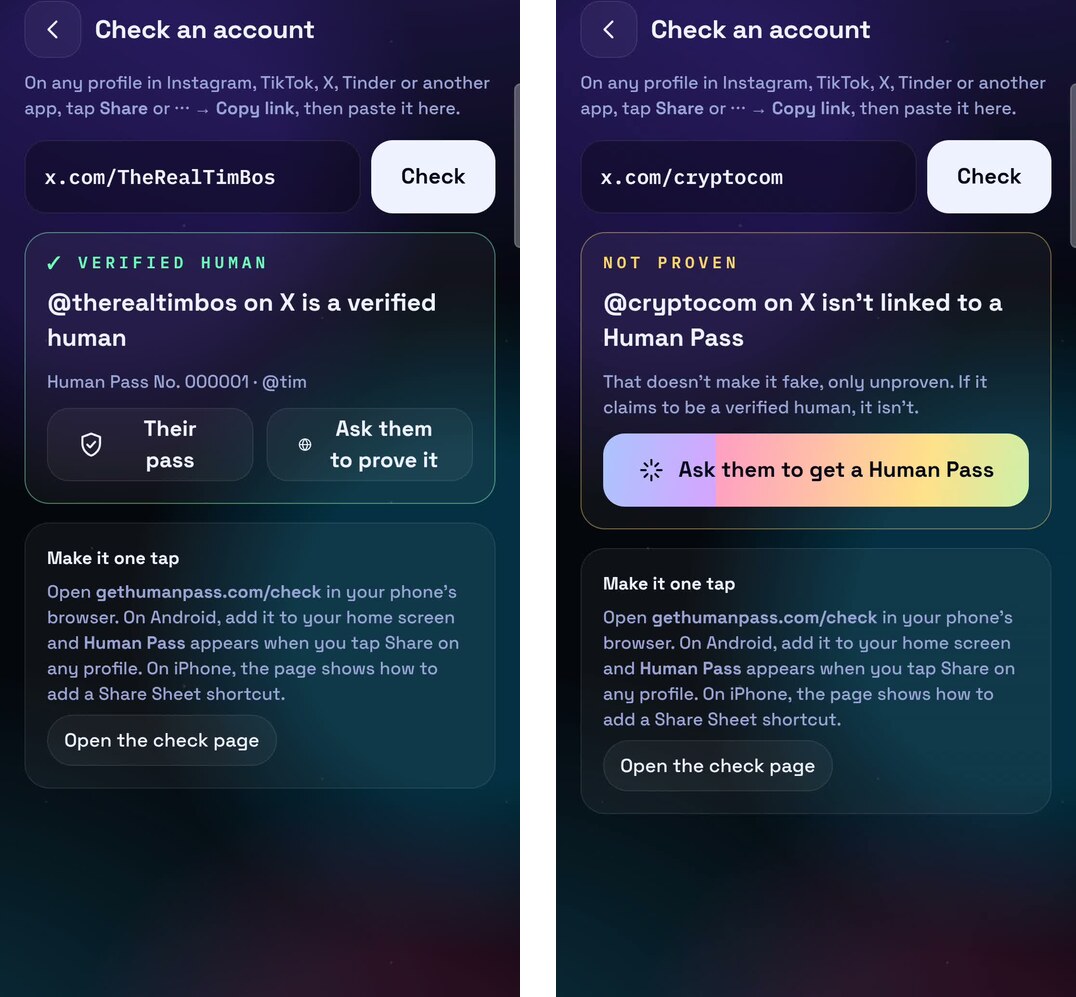
Open Check an account in the Human Pass Me module and paste a profile link from Instagram, TikTok, X, Tinder or anywhere else. If a Verified Human holds that account, you’ll see their pass. If they don’t, it says the account isn’t proven, which doesn’t make it fake, and you can ask them to get a Human Pass with one tap. You can also check any account from a browser at gethumanpass.com/check.
It links your social accounts to you, privately.
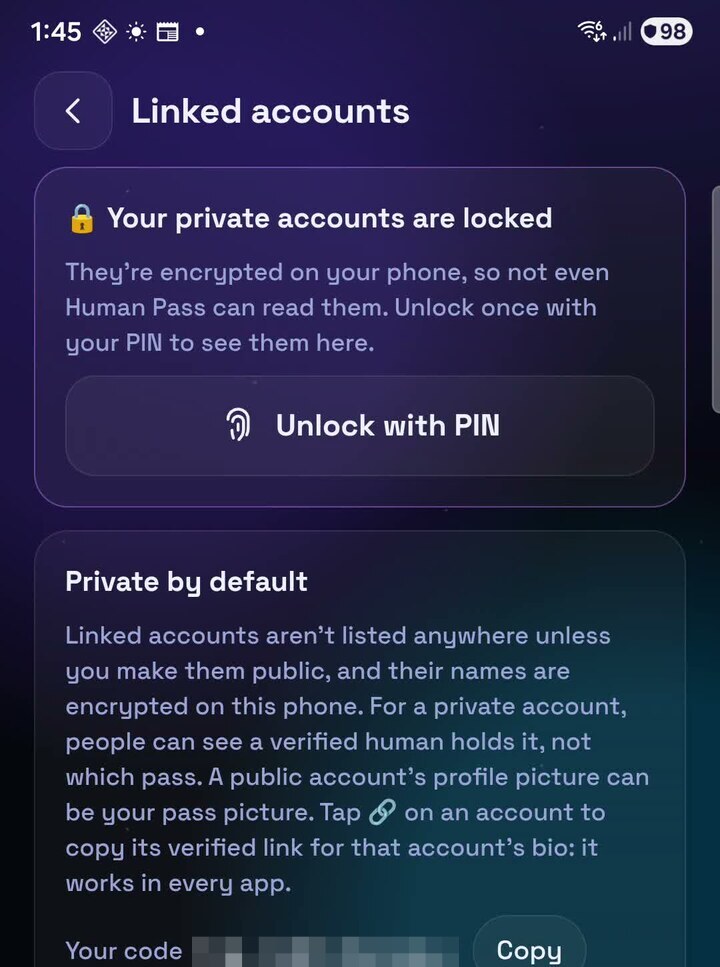
You can link your social accounts to your pass so people know a Verified Human runs them. Linking X is live now. You post a short code from your account, tap Verify, and the link is recorded on ShareLedger as a salted hash, so it can be checked but nobody can use it to list your accounts.
Linked accounts are private by default. People who check one of your accounts learn that a Verified Human holds it and nothing else. If you’d rather show your pass number and handle, you can make the link public in the Human Pass Me module.
It proves you’re human on websites.
Websites can add Sign in with Human Pass. When a site asks you to prove you’re human, you approve with your PIN and the site gets a yes. Each site gets its own private ID for you, so sites can’t compare notes and follow you around the web.
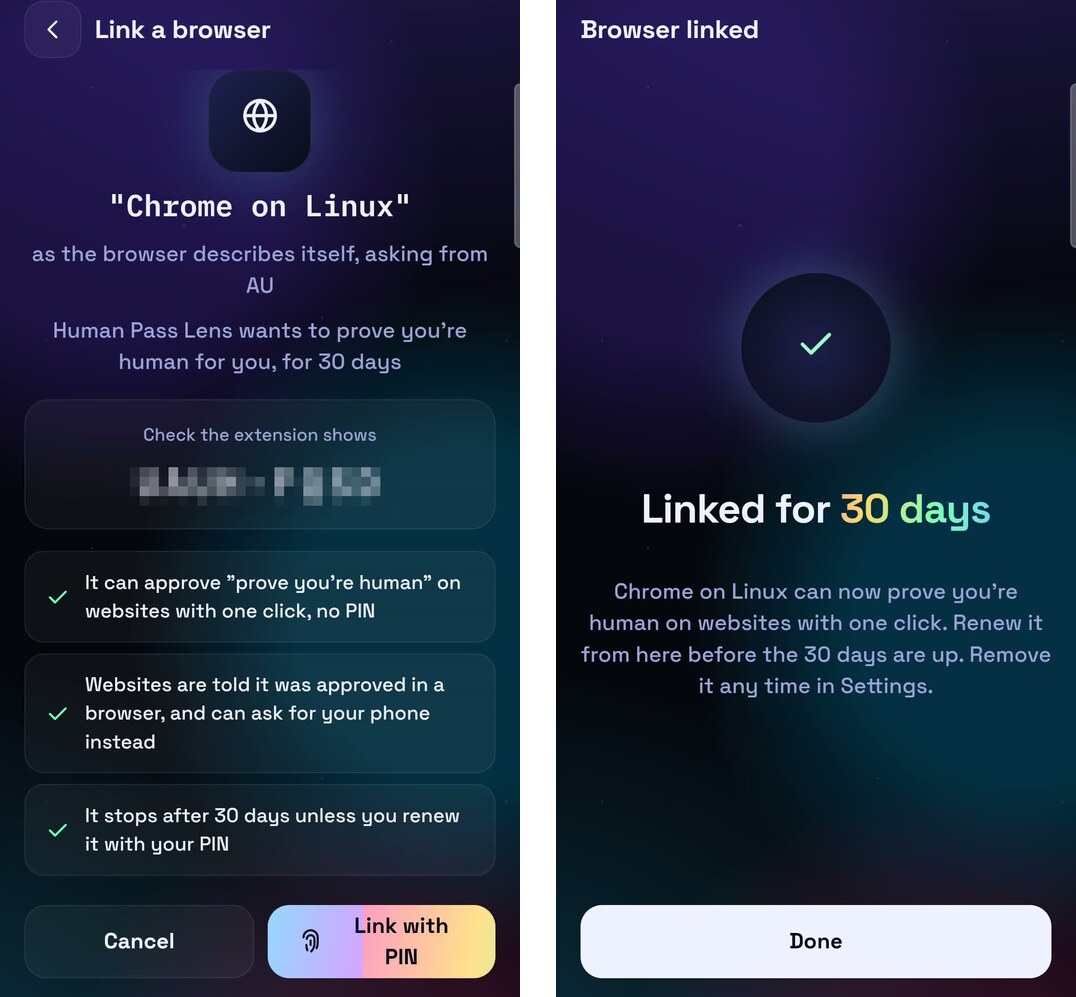
On a computer, Human Pass Lens, our free Chrome extension, can approve those requests for you with one click once it’s linked to your pass.
Human Pass Lens: see Verified Humans in Chrome.
Human Pass Lens is a free Chrome extension from ShareRing for your computer. It marks Verified Humans on X and other social sites as you browse, and once it’s linked to your pass it lets you prove you’re human on websites with one click.
It’s built to know as little about you as possible. To check an account it sends only the platform and the handle, it keeps nothing about what you look up, and it doesn’t read your messages, your feed or your logins.
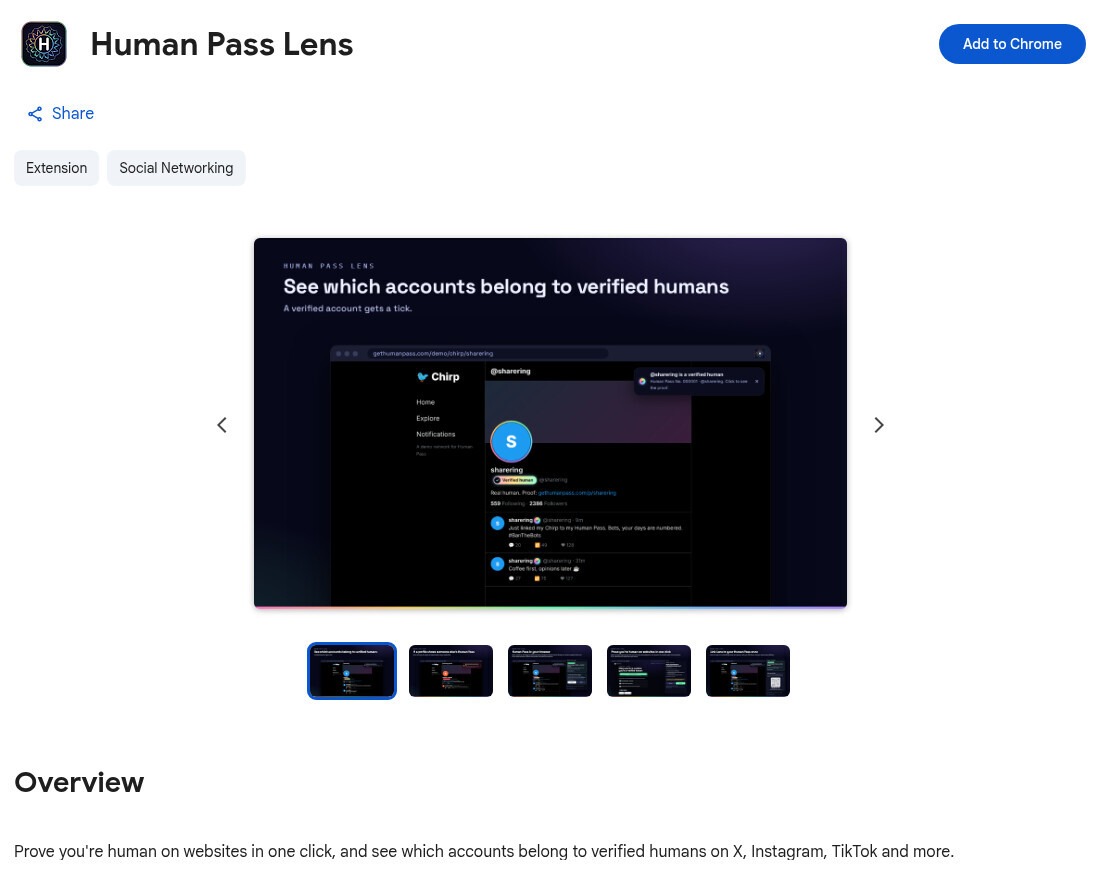
How to install Human Pass Lens.
- On your computer, open Human Pass Lens in the Chrome Web Store in Google Chrome.
- Click Add to Chrome, then Add extension.
- Click the jigsaw piece icon at the top right of Chrome and pin Human Pass Lens, so it’s always in your toolbar.
- Open my X profile to see it working. You’ll see the Verified Human badge next to my name.
Link Human Pass Lens to your pass.
If you hold a Human Pass, click the Human Pass Lens icon in Chrome and choose Link this browser. In the Human Pass Me module, tap Scan, scan the code Human Pass Lens shows and approve with your PIN. For the next 30 days, when a website asks you to prove you’re human, you press Approve in Chrome. After 30 days you renew it from your phone, and you can remove the browser at any time from the Human Pass Me module or from Human Pass Lens.
What you can do with it.
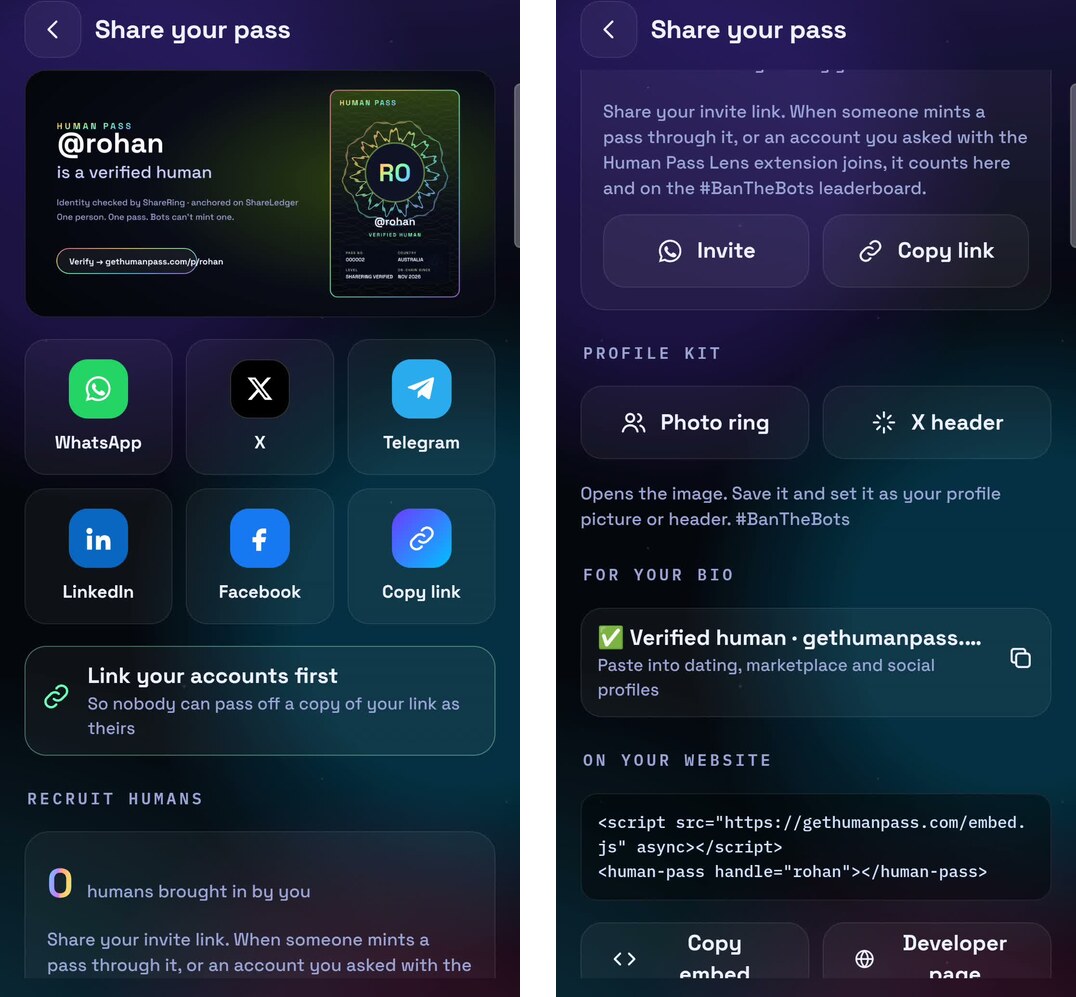
When you want to show your pass, the Human Pass Me module makes a share card for WhatsApp, X, Telegram, LinkedIn and Facebook. Its profile kit has a photo ring and an X header with your pass on them, a line for your bio and a badge you can put on your own website.
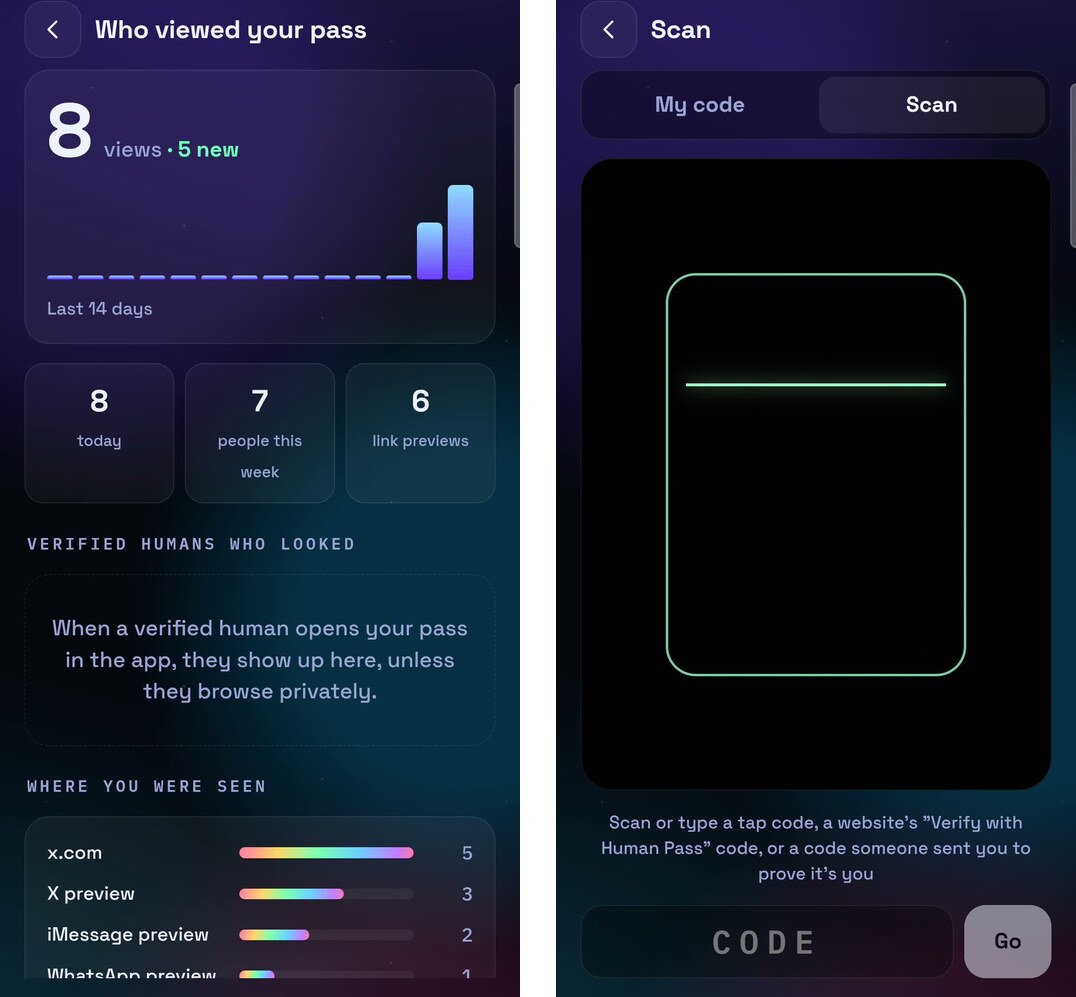
To see who’s been checking you, open Viewers. It shows how many people looked at your pass in the last 14 days and where they saw it, and lists the Verified Humans who looked, unless they chose to browse privately.
The Scan screen reads a code from a website’s Verify with Human Pass button, from Human Pass Lens or from someone who sent you one, so you can prove you’re human wherever you’re asked.
Every pass also has an invite link, and when someone mints a pass through it, it counts toward you on the #BanTheBots leaderboard.
What Human Pass will do next.
X is the first social platform you can link. Instagram, TikTok, Bluesky, GitHub, YouTube, LinkedIn and more are being rolled out over the coming weeks, and you’ll link them all to the same pass.
Further out, we want the platforms to check Human Pass themselves. Today it works on top of social media through the Human Pass Me module and Human Pass Lens. If the platforms checked Human Pass directly, everyone using their apps would see who’s a Verified Human, and bot farms would have nothing to scale with. We’ll go through what that would mean for social media in our next post.
For the background on why this kind of check can work without exposing your data, read seven things that make self-sovereign identity different and how ShareRing protects your identity with three verification levels.
How to get your Human Pass.
- Get ShareRing Me from the App Store or Google Play and verify your ID, if you haven’t already.
- Open the Human Pass Me module and mint your pass.
- Link your X account and share your pass with #BanTheBots.
- On a computer, add Human Pass Lens from the Chrome Web Store to see Verified Humans as you browse.
 Get started with Human Pass
About Human Pass: sharering.network/human-pass
Check an account or see a pass: gethumanpass.com
Human Pass Me module: inside the ShareRing Me app on the App Store and Google Play
Human Pass Lens for Chrome: Chrome Web Store
For websites and platforms: gethumanpass.com/developers
FAQ.
Does anyone see my name or my ID?
No. Your documents stay in your ShareRing Me vault. A site or a person checking your pass learns that a Verified Human holds it, and a private link doesn’t even show which pass.
Can I have more than one Human Pass?
No. Each verified identity and each ID document can back one pass, which is what stops one person or one bot farm from minting thousands.
What happens if I lose my phone?
Your pass belongs to your ShareRing account, not the phone. Install ShareRing Me on your new phone and restore your pass in the Human Pass Me module with your PIN, and you keep the same handle, number and history.
Do I need Human Pass Lens?
Not to have a pass. Human Pass Lens is for Chrome on a computer, where it marks Verified Humans as you browse and lets you approve website checks with one click. On your phone, use Check an account in the Human Pass Me module, and approve website checks with your PIN.
How can my website or app use Human Pass?
Add Sign in with Human Pass, the lookup API or the website badge. Everything is on our developer page.
Get your Human Pass.
We’re starting with your pass, X and the web, and adding the other platforms over the coming weeks. Mint your pass in the Human Pass Me module, link your X account and share it with #BanTheBots. If you run a platform, a marketplace or a community and want to keep bots out without collecting anyone’s documents, get in touch with me directly.
Visit Human Pass on our websiteSee the #BanTheBots leaderboard
By Rohan Le Page, Founder and Co-CEO of ShareRing
#PrivacyKYC #DigitalIdentity #HumanPass #BanTheBots #ReusableKYC #Private #Secure #Verified