How We Integrated ShareRing Link with Zealy for Automated KYC & Staking Verification
A complete integration guide showing how to connect zero-knowledge identity verification and on-chain staking checks to Zealy's quest platform — with N8N as the middleware.
View on GitHubThe Challenge
For our MEXC Node Giveaway campaign, we needed participants to complete KYC verification via ShareRing Me and prove on-chain staking to ShareLedger validators — all within Zealy's gamified quest platform. ShareLedger isn't a natively supported chain in Zealy, and our verification requires zero-knowledge proofs from the ShareRing Link SDK, something no existing Zealy integration supports.
We needed a solution that could bridge Zealy's API task system with ShareRing Link's browser-based QR verification and Cosmos SDK staking queries, all without requiring users to manually copy-paste wallet addresses or verification codes.
Components
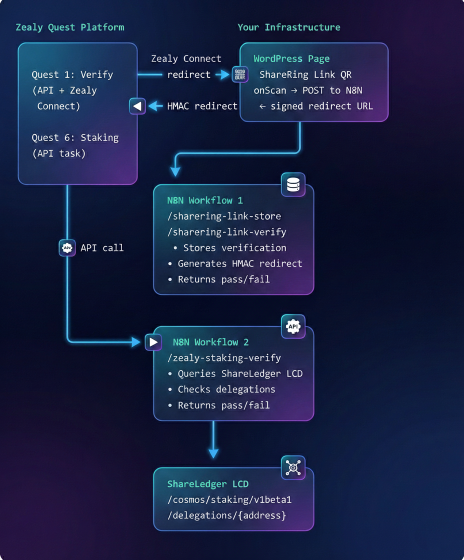
The integration connects four systems through N8N middleware, with a WordPress page template serving as the bridge between Zealy's redirect flow and ShareRing Link's QR-based verification.
Quest 1: Verify with ShareRing
This is the core integration. Zealy's Zealy Connect identification method redirects users to our WordPress page, where ShareRing Link captures their KYC status and wallet address via a zero-knowledge QR scan. N8N handles HMAC signing and stores the verification server-side.
User clicks "Claim" on Quest 1 in Zealy
Zealy redirects to your WordPress page with ?zealyUserId=xxx&callbackUrl=yyy&signature=zzz
WordPress page renders ShareRing Link QR code
The page extracts Zealy parameters from the URL and initialises the ShareRing Link JavaScript library with your Query ID and owner address.
User scans QR with ShareRing Me app
The app performs a zero-knowledge proof, sharing only the user's KYC verification status and ShareLedger wallet address — no personal data leaves the device.
Page POSTs scan data to N8N
The browser sends { zealy_user_id, wallet_address, kyc_verified, callback_url } to the N8N store webhook.
N8N stores data and generates HMAC-signed redirect URL
The community secret stays server-side in N8N. It generates ?identifier=wallet&signature=hmac and returns the signed redirect URL to the browser.
Browser redirects user back to Zealy
Zealy verifies the HMAC signature, stores the wallet as the user's zealy-connect identifier, and then calls the N8N verify endpoint to confirm the quest.
Key insight: The browser holds both contexts — the Zealy user ID from the URL and the ShareRing Link result from the onScan callback. No database or session store needed. The community secret never touches the browser.
Quest 6: Verify On-Chain Staking
Once a user's wallet is stored via Zealy Connect in Quest 1, subsequent quests can automatically access it. Quest 6 uses the same Zealy Connect identifier to query ShareLedger's Cosmos LCD endpoint for delegation data.
User claims Quest 6 in Zealy
Zealy sends a POST to your N8N webhook with the user's zealy-connect wallet address (stored from Quest 1 — no re-verification needed).
N8N queries ShareLedger LCD
Fetches /cosmos/staking/v1beta1/delegations/{walletAddress} and checks for active delegations to the target validator(s).
N8N returns pass/fail
HTTP 200 = staking verified (quest completes). HTTP 400 = insufficient stake or wrong validator (quest fails with a user-friendly message).
// N8N HTTP Request node queries the Cosmos staking API
GET https://lcd.explorer.shareri.ng/cosmos/staking/v1beta1/delegations/{walletAddress}

// Headers (required to bypass Cloudflare)
User-Agent: Mozilla/5.0 (compatible; ShareRingZealy/1.0)

// Response contains delegation_responses[] with:
//   delegation.validator_address  → compare to your target validators
//   balance.amount               → in nshr (1 SHR = 10^9 nshr)
Quest Structure
Our campaign used 13 quests across four categories: onboarding, staking verification, social engagement, and referrals. Quest 1 (KYC) serves as the gateway — it blocks all other categories until completed.
| # | Quest | Type | XP | Review |
|---|---|---|---|---|
| 1 | Verify with ShareRing | API + Zealy Connect | 200 | Auto (N8N) |
| 2 | Submit MEXC UID | Text input | 50 | Manual |
| 3 | Proof of SHR Purchase | File upload | 100 | Manual |
| 4–5 | MEXC Balance Checks | File upload | 50 each | Manual |
| 6 | Verify On-Chain Staking | API + Zealy Connect | 200 | Auto (N8N) |
| 7–11 | Social (Follow, Tweet, RT, Telegram) | Social tasks | 25–75 | |
| 12 | Create Original Content | URL submission | 150 | Manual |
| 13 | Refer a Friend | Referral | 100/each |
Zealy API v2 key facts: Base URL is https://api-v2.zealy.io. Authentication uses x-api-key header (not Bearer token). API paths use community subdomain, not community ID. For API tasks, Zealy calls YOUR endpoint — return HTTP 200 for pass, 400 for fail.
Middleware Configuration
Two N8N workflows handle all automated verification. Both require HTTPS endpoints (Zealy won't call HTTP). Each webhook uses Header Auth with an API key that must match the one configured in Zealy's quest task settings.
Workflow 1: KYC Verification
Contains two webhook paths in one workflow:
// Path 1: Called by WordPress page after QR scan
POST /webhook/sharering-link-store
  ← Receives scan data + callbackUrl
  → Returns HMAC-signed redirect URL

// Path 2: Called by Zealy when user claims quest
POST /webhook/sharering-link-verify
  ← Receives { userId, accounts: { 'zealy-connect': wallet } }
  → Returns 200 (pass) or 400 (fail)
The Store & Generate Redirect URL node does the heavy lifting — it stores verification data in N8N's workflow static data (keyed by Zealy user ID), builds the callback URL with the wallet as the identifier parameter, and signs it with HMAC-SHA256 using the community secret.
const crypto = require('crypto');
const COMMUNITY_SECRET = 'YOUR_COMMUNITY_SECRET';

// Build callback URL with wallet as identifier
const separator = callbackUrl.indexOf('?') !== -1 ? '&' : '?';
const urlWithId = callbackUrl + separator +
  'identifier=' + encodeURIComponent(walletAddress);

// HMAC-SHA256 sign (before appending signature param)
const hmac = crypto.createHmac('sha256', COMMUNITY_SECRET);
hmac.update(urlWithId);
const signature = hmac.digest('hex');
const redirectUrl = urlWithId + '&signature=' + signature;
Workflow 2: Staking Verification
Single webhook: /webhook/zealy-staking-verify. Extracts the wallet from the Zealy Connect identifier, queries the ShareLedger LCD endpoint for delegations, and checks the target validator(s) and minimum stake amount.
Gotcha: ShareLedger balances are in nshr (nano-SHR), not ushr. 1 SHR = 1,000,000,000 nshr. Also, the LCD endpoint behind Cloudflare requires a User-Agent header or N8N will get a 403.
Page Template
The verification page is a WordPress page template (page-sharering-verify.php) that loads the ShareRing Link JavaScript library and handles the Zealy Connect redirect flow. It uses wp_enqueue_script with proper dependency chains to ensure jQuery, the QR code plugin, and the ShareRing library load in the correct order.
<?php
wp_enqueue_script('jquery');
wp_enqueue_script('jquery-qrcode',
  'https://cdnjs.cloudflare.com/ajax/libs/jquery.qrcode/1.0/jquery.qrcode.min.js',
  array('jquery'), '1.0', false);
wp_enqueue_script('sharering-link-lib',
  'https://raw.githack.com/.../sharering.query.lib.prod.min.js',
  array('jquery', 'jquery-qrcode'), '1.0', false);
wp_add_inline_script('sharering-link-lib', 'var $ = jQuery;', 'before');
?>
Three values to configure in the template: the ShareRing Link Query ID (with client ID), the Query Owner address, and your N8N webhook URL. The community secret is never in this file — it stays server-side in N8N.
What We Discovered
Zealy Connect is the right choice for custom chains
ShareLedger isn't in Zealy's supported wallet list. Zealy Connect lets you use any identifier — once stored in Quest 1, it persists across all subsequent quests automatically.
HMAC signing must stay server-side
Our initial implementation had the community secret in the WordPress page's JavaScript. Moving HMAC generation to N8N was critical — the secret should never be exposed client-side.
N8N webhook response mode matters
Use responseMode: responseNode (not lastNode) so you can return different HTTP status codes. Zealy interprets 200 as pass and 400 as fail.
Cloudflare blocks N8N's default User-Agent
If your LCD endpoint is behind Cloudflare, add a browser-like User-Agent header to the HTTP Request node or you'll get 403 errors.
WordPress jQuery is in noConflict mode
The ShareRing Link library uses $, but WordPress only exposes jQuery. You need var $ = jQuery; before the library loads, and the QR code plugin must be registered as a dependency.
What's Included
Everything you need to replicate this integration for your own project. Clone the repository and follow the README for step-by-step setup.